
Understanding Vector Databases for Backend Engineers
What vector databases actually are, how they work under the hood, when to use one instead of Postgres, and how to explain it all with confidence in your next backend interview.

Hello “👋”
Welcome to another week, another opportunity to become a Great Backend Engineer.
Today's issue is brought to you by Masteringbackend → An all-in-one platform that helps backend engineers become highly-paid backend and AI engineers by leveraging a practical-based learning approach.
Here's another issue of Backend Weekly — your favorite newsletter on mastering backend engineering through real-world systems and interview design questions.
Before we dive in:
Every AI-powered feature you’ve seen in the last two years — semantic search, chatbots that answer from your docs, recommendation engines that actually understand context — has the same thing under the hood: vector embeddings stored in a database designed to search them.
If you’re a backend engineer building anything that touches AI, understanding vector databases is no longer optional. It’s the data layer you’ll be asked about in your next interview, and the one your team will ask you to architect next quarter.
That’s why we built the “Golang30 AI Bootcamp” to help you learn how to build 10 production-ready AI projects in Golang. 30 days. Real systems. Real production patterns.
This is the AI Backend Engineer Series on Backend Weekly.
In this series, I will guide you through understanding and learning AI backend engineering. Let’s get started with episode 3 of this series. Episode 2 here
You’re in an AI Engineer interview.
They ask:
“What is a vector database, how does it work under the hood, and when would you use one instead of a traditional database in a backend AI system?”
Here’s how to approach it:
Every database you’ve ever used answers the same kind of question: “Give me the row where id = 42.” Or “Give me all rows where status = 'active' and created_at > '2025-01-01'.”
These are exact-match queries. The database compares values. Either a row matches, or it doesn’t. This works brilliantly for structured data, and it’s the foundation of every production system you’ve built.
But what if the question isn’t exact?
“Find me documents that are about contract disputes, even if the word ‘contract’ never appears.” Or “Find me products similar to this one.” Or “Find the 10 most relevant knowledge base articles for this customer question.”
Traditional databases can’t answer these questions. They don’t understand the meaning because they compare bytes.
Vector databases can.
Therefore, as a backend engineer building AI-powered features in 2026, you need to understand how.
What Is a Vector Database?
Start here with your interviewer:
A vector database is a database system purposely built for storing, indexing, and searching high-dimensional vectors, also called embeddings.
An embedding is a numerical representation of a piece of data, a sentence, an image, a product, or a user profile, produced by a machine learning model. The model converts the meaning of the data into a list of numbers, typically 768 to 1536 dimensions.
The key property is that things that are semantically similar end up close together in vector space.
The sentences “My order hasn’t arrived” and “Where is my package?” produce embeddings that are close to each other, even though they share zero words.
A vector database does one thing exceptionally well. It is designed to efficiently search through embeddings.
Given a query vector, it finds the K most similar vectors in the database. This process is called similarity search, and it powers semantic search, RAG pipelines, recommendation systems, anomaly detection, and multi-modal search across text, images, and audio.
Discuss this with your interviewer:
The core difference between a traditional database and a vector database is the type of question it answers. A traditional database answers "find the exact match." A vector database answers "find the closest meaning."
How Vector Search Works Under the Hood
When a query arrives at a vector database, this is what happens:
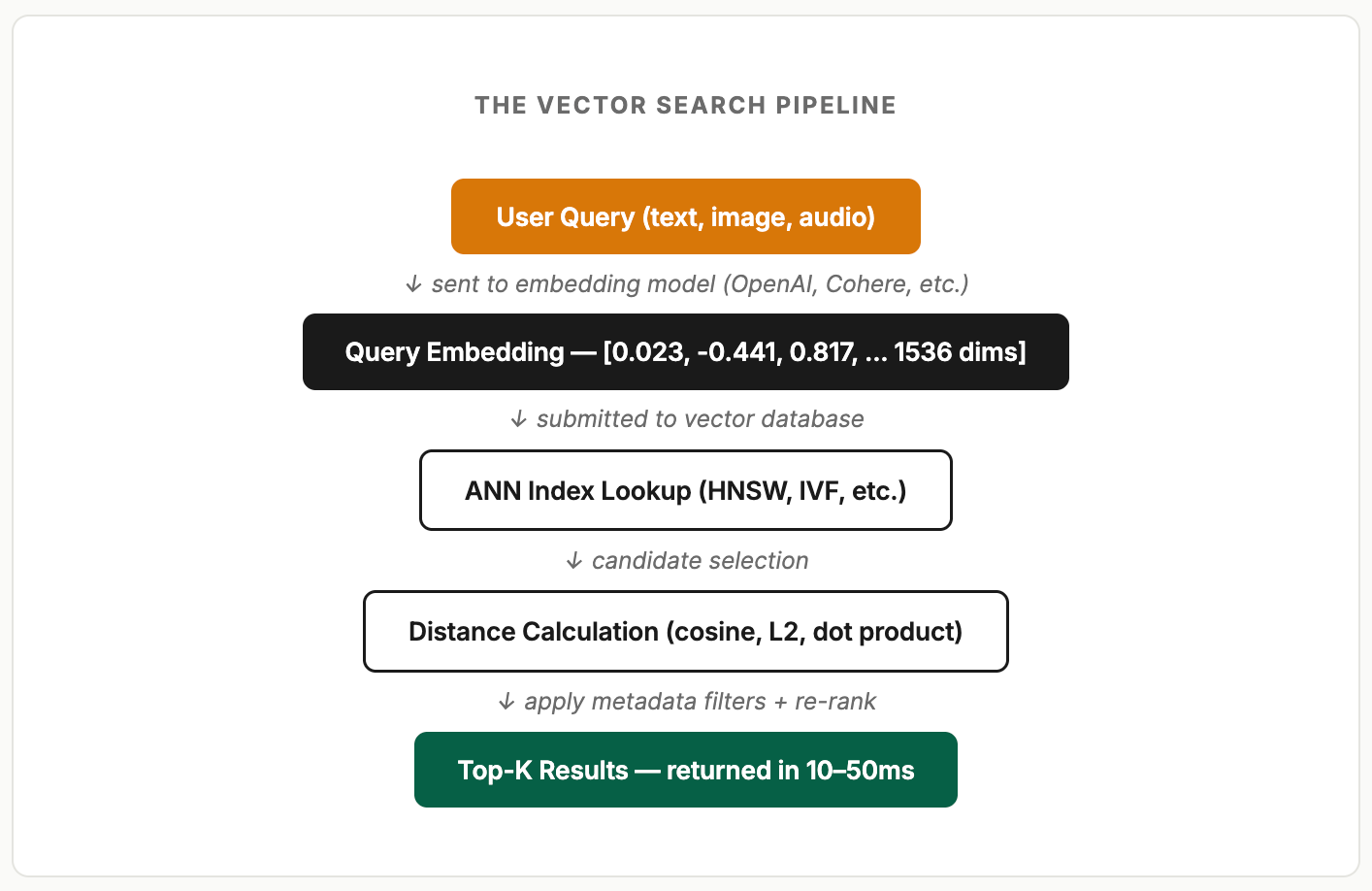
The critical step is the index lookup.
Without an index, finding the most similar vectors requires comparing the query against every single vector in the database. That’s a brute-force scan [O(n)] and it’s prohibitively slow once you have more than a few thousand vectors.
This is where Approximate Nearest Neighbor (ANN) algorithms come in. They trade a tiny amount of accuracy for massive speed improvements, finding results that are “close enough” to the true nearest neighbors in a fraction of the time.
The Indexing Algorithms You Need to Know
Three indexing algorithms come up in interviews. You don’t need to implement them from scratch, but you need to understand what they do, when to use them, and their trade-offs.
HNSW (Hierarchical Navigable Small World)
The most widely used ANN index in production today. HNSW builds a multi-layered graph where each node is a vector and edges connect similar vectors. The top layers have long-range connections (for fast global navigation), and the bottom layers have short-range connections (for precise local search).
Think of it like a skip list, but in high-dimensional space. You start at the top layer, make big jumps to get close to the target region, then descend layer by layer to find the exact nearest neighbors.
Speed: Excellent query performance. Sub-millisecond at millions of vectors.
Recall: Very high, typically 95–99%+ with proper tuning.
Trade-off: High memory usage. The entire graph lives in RAM. Slower build times than IVF.
Best for: Most production workloads under 50M vectors where query speed matters most.
IVFFlat (Inverted File Index)
IVF works by clustering your vectors into groups using k-means, then only searching the clusters closest to the query vector. Instead of scanning every vector, it scans only the relevant clusters, dramatically reducing the search space.
Speed: Good, but slower than HNSW for most workloads.
Recall: Depends heavily on the number of clusters scanned. More clusters = higher recall = slower search.
Trade-off: Requires a training step — you need existing data before building the index. Not great for tables that start empty.
It is best for: Large datasets where memory is constrained. Often combined with Product Quantization (PQ) for compression.
Flat (Brute Force)
This algorithm needs no index at all. It compares the query against every single vector with 100% recall, but O(n) scan time.
The flat (Brute force) strategy is best for small datasets (under 10K vectors), benchmarking recall of other indexes, or when perfect accuracy is required.
Tell your interviewer this:
HNSW is the default choice for most production systems. Use IVF when you have billions of vectors, and memory is the constraint. Use flat only when the dataset is small enough that brute-force is fast.
Distance Metrics: How “Similar” Is Defined
The database needs a function to measure how close two vectors are. Three distance metrics dominate:
Cosine Similarity: Measures the angle between two vectors. Ignores magnitude, focuses on direction. This is the default for most text embedding models like OpenAI, Cohere, and Sentence Transformers, all of which normalize their outputs. Use this unless you have a specific reason not to.
L2 (Euclidean) Distance: Measures the straight-line distance between two points. Considers both direction and magnitude. Better when magnitude carries meaning, like user activity intensity.
Dot Product (Inner Product): A fast alternative to cosine when vectors are already normalized. Often used by recommendation systems.
When building the index, you must specify which distance metric to use, and your queries must use the same one. Mixing them is a silent correctness bug that’s hard to catch.
Vector Search with pgvector
Here’s where it gets practical.
For most backend teams, the right starting point is not a dedicated vector database, but it’s pgvector, the PostgreSQL extension that adds vector columns, distance operators, and ANN indexing to the database you’re already running.
Here’s why?
Your documents and embeddings live in the same table, in the same transaction, with no sync pipeline or extra credentials. Additionally, your team has no new service to monitor. For workloads under 5 million vectors, pgvector’s performance is more than adequate.
Setting Up pgvector
-- Enable the extension
CREATE EXTENSION vector;

-- Create a table with a vector column
CREATE TABLE documents (
  id       SERIAL PRIMARY KEY,
  title    TEXT NOT NULL,
  content  TEXT NOT NULL,
  metadata JSONB DEFAULT '{}',
  embedding VECTOR(1536)  -- OpenAI ada-002 outputs 1536 dims
);

-- Create an HNSW index for cosine similarity
CREATE INDEX ON documents
  USING hnsw (embedding vector_cosine_ops)
  WITH (m = 16, ef_construction = 64);

-- m = max connections per node (higher = more accurate, more memory)
-- ef_construction = build-time search depth (higher = better index, slower build)
Inserting Embeddings
import { OpenAI } from "openai";
import { Pool } from "pg";

const openai = new OpenAI();
const pool = new Pool({ connectionString: process.env.DATABASE_URL });

async function insertDocument(title: string, content: string) {
  // 1. Generate the embedding from the content
  const response = await openai.embeddings.create({
    model: "text-embedding-3-small",
    input: content,
  });

  const embedding = response.data[0].embedding; // float[] of 1536 dims

  // 2. Store both the content AND the embedding in the same row
  await pool.query(
    `INSERT INTO documents (title, content, embedding)
     VALUES ($1, $2, $3)`,
    [title, content, JSON.stringify(embedding)]
  );
}
Querying: Semantic Search
async function semanticSearch(query: string, limit: number = 5) {
  // 1. Embed the query with the SAME model used for documents
  const response = await openai.embeddings.create({
    model: "text-embedding-3-small",
    input: query,
  });

  const queryEmbedding = response.data[0].embedding;

  // 2. Find the closest vectors using cosine distance (<=>)
  const result = await pool.query(
    `SELECT id, title, content,
            1 - (embedding <=> $1::vector) AS similarity
     FROM documents
     ORDER BY embedding <=> $1::vector
     LIMIT $2`,
    [JSON.stringify(queryEmbedding), limit]
  );

  return result.rows;
  // Returns: [{ id, title, content, similarity: 0.92 }, ...]
}
Notice the <=> operator.
That’s pgvector’s cosine distance operator. The HNSW index kicks in automatically. PostgreSQL’s query planner knows to use it. You get ANN search through standard SQL, in the same transaction as your regular queries.
Hybrid Search: Combining Vector and Metadata Filters
In production, pure vector search is rarely enough. You almost always need to combine semantic similarity with traditional filters, by user, by date, by category, by tenant. Discuss this with your interviewer.
// Find support articles similar to a question, but only for a specific product
const result = await pool.query(
  `SELECT id, title, content,
          1 - (embedding <=> $1::vector) AS similarity
   FROM documents
   WHERE metadata->>'product' = $2
     AND metadata->>'status' = 'published'
   ORDER BY embedding <=> $1::vector
   LIMIT 10`,
  [JSON.stringify(queryEmbedding), "billing-api"]
);
This is one of pgvector's biggest advantages: the WHERE clause and the vector search happen in the same query, in the same transaction, against the same table. No sync pipeline between a metadata store and a vector store.
pgvector vs Dedicated Vector Databases
This is where many candidates stumble. They either always say “use Pinecone” or always say “use Postgres.” The right answer depends on the workload. Walk your interviewer through the decision:
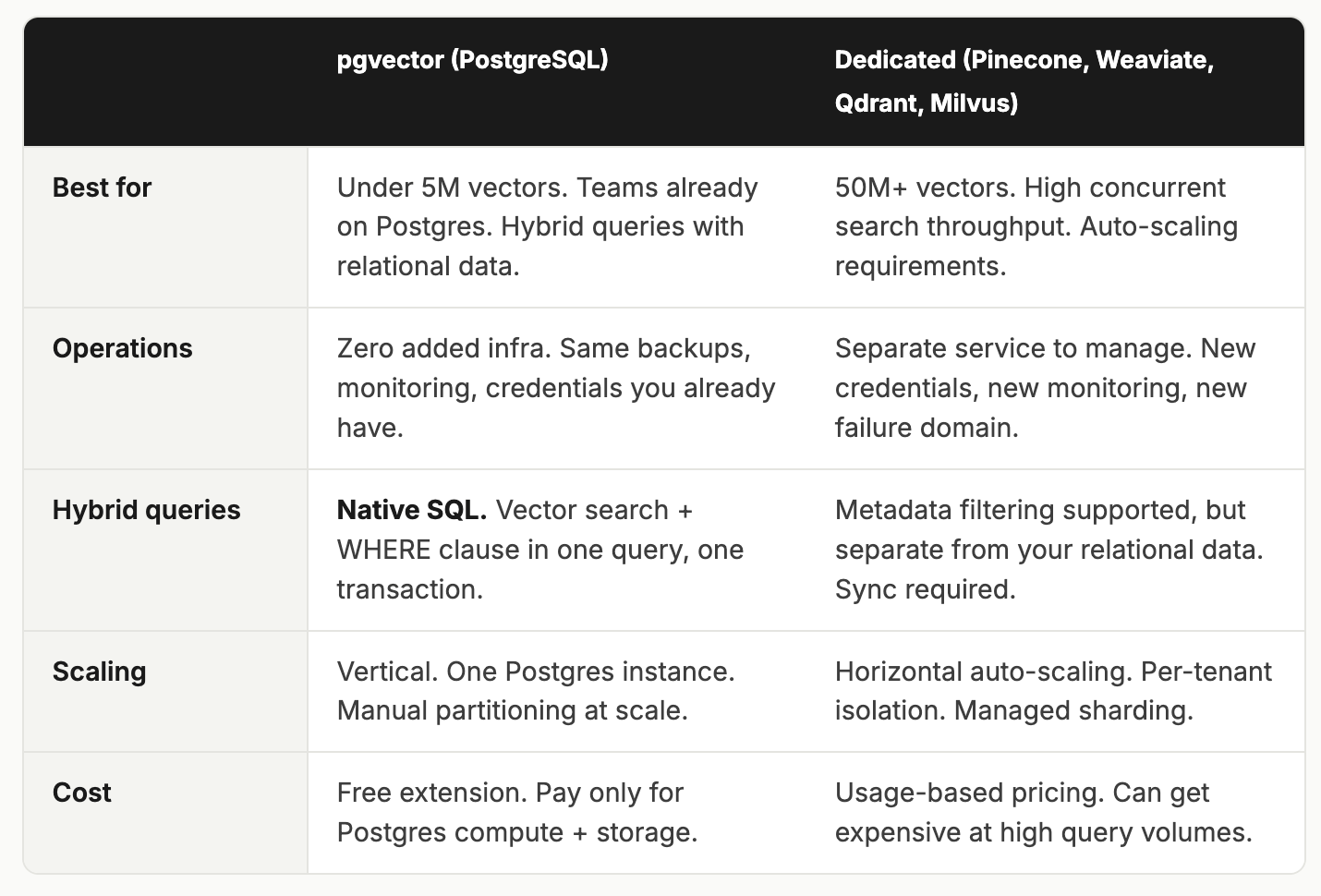
Rule of thumb:
Start with pgvector. It handles more than most teams realize. Move to a dedicated vector database when you hit a scaling ceiling that Postgres can't solve, hundreds of millions of vectors, auto-scaling requirements, or multi-tenant isolation at the vector level.
Real-World Use Cases for Backend Engineers
Don’t just list use cases, explain them in terms your interviewer will recognize as production systems:
RAG (Retrieval-Augmented Generation): The most common use case. You embed your knowledge base, store the vectors, and when a user asks a question, you embed the question, find the K most relevant documents via vector search, and feed those documents to the LLM as context. The LLM answers from your data, not from its training set. This is how every “chat with your docs” feature works.
Semantic search: Traditional search requires keyword matching. With vector search, a query for “how to cancel my subscription” will surface articles about “membership termination” and “account deactivation”, because the embeddings are close together in meaning.
Recommendation engines: Embed your products, your users, and their interactions. Find products whose embeddings are closest to what a user has engaged with. Shopify uses a hybrid vector + keyword search for product discovery at scale.
Anomaly detection: Embed your normal system behavior. When a new data point is far from all known embeddings, flag it as anomalous. Used in fraud detection and security monitoring.
Deduplication: Finding near-duplicate content, support tickets, product listings, and user-generated posts that wouldn’t be caught by exact-match comparison.
Observability and Production Concerns
You can’t manage what you can’t see. Discuss these with your interviewer:
Metrics to Track
Query latency (p50, p95, p99): Vector search should complete in 10–50ms. If it’s above 200ms, your index parameters need tuning, or your dataset has outgrown a single instance.
Recall accuracy: Periodically run ground-truth comparisons, flat (brute-force) search vs your ANN index, to verify recall hasn’t degraded. Target 95%+ for most applications.
Embedding generation latency: The API call to your embedding model (OpenAI, Cohere) is often the bottleneck, not the vector search itself. Track this separately.
Index build time: HNSW indexes can take minutes to hours on large datasets. Track rebuild durations and plan around them.
Memory usage: HNSW indexes live in RAM. Monitor memory consumption as your vector count grows. A 1536-dimension vector at 32-bit precision is ~6KB — 1 million vectors = ~6GB of index memory before overhead.
Common Production Pitfalls
Embedding model mismatch: If you embed your documents,
text-embedding-3-smallbut query withtext-embedding-ada-002. The results will be garbage. Always use the same model for both insertion and query. Store the model name as metadata.Stale embeddings: When your source content changes, the embedding doesn’t automatically update. Build a re-embedding pipeline triggered by content updates.
Missing distance metric alignment: If you build your HNSW index with
vector_cosine_ops, but query usingvector_l2_ops. The index won’t be used. PostgreSQL will fall back to a sequential scan. Always match the index and query operators.
Final Answer
“A vector database is purpose-built for storing and searching high-dimensional embeddings by semantic similarity, rather than exact match. Under the hood, it uses ANN algorithms, primarily HNSW, to find the K nearest neighbors in sub-linear time. For most backend teams, I’d start with pgvector: it adds vector columns, cosine distance operators, and HNSW indexing directly to PostgreSQL, so embeddings and metadata live in the same table, same transaction, same query. This avoids the sync pipeline and operational overhead of a separate vector store. I’d move to a dedicated solution like Pinecone or Weaviate only when the workload exceeds what a single Postgres instance can handle, hundreds of millions of vectors, or high concurrent search throughput. The key production concerns are embedding model consistency, index memory budgeting, and recall monitoring.”
Understanding vector databases sounds like an AI-specific topic. Something for ML engineers, not backend engineers. But as you dig in, you realize the core challenges are deeply familiar:
Choosing the right index type for a workload is the same trade-off you’ve made with B-trees vs hash indexes vs GIN
Memory budgeting is the same capacity planning you do for any in-memory data structure
Consistency guarantees between data and its derived representations are the same challenge as materialized views or search indexes
Hybrid querying is combining new query patterns with existing relational data in the same transaction
Observability, latency, recall, and throughput are the same metrics discipline you apply to any production system
Vector databases are not some exotic new technology that requires you to unlearn everything you know. They are an extension of the same storage engineering principles you’ve been applying for years, applied to a new data type and a new class of query.
So the next time an interviewer asks, “What is a vector database and when would you use one?” don’t just say “it’s a database for AI embeddings.”
Walk them through how HNSW builds its multi-layered graph. Explain why cosine similarity is the default for text embeddings. Show them the pgvector query that combines a WHERE clause with a vector search in a single SQL statement. Tell them exactly when you’d outgrow Postgres and why.
That’s the answer that shows you understand the engineering underneath and not just the buzzword on top.
I hope you learned something today: Spread the love. Share this newsletter with at least two of your friends today.
Also, let me know if you enjoy this series and if you want me to continue breaking down interview questions like this.
Remember to start learning backend engineering from our courses:
Get a 50% discount on any of these courses. Reach out to me (Reply to this mail)
Backend Engineering Resources
Whenever you’re ready
There are 3 ways I can help you become a great backend engineer:
1. The MB Platform: Join 4000+ backend engineers learning backend engineering on the MB platform. Build real-world backend projects, track your learnings and set schedules, learn from expert-vetted courses and roadmaps, and solve backend engineering tasks, exercises, and challenges.
2. The MB Academy: The “MB Academy” is a 6-month intensive Advanced Backend Engineering BootCamp to produce great backend engineers.
3. GetBackendJobs: Access 1000+ tailored backend engineering jobs, manage and track all your job applications, create a job streak, and never miss applying. Lastly, you can hire backend engineers anywhere in the world.
LAST WORD 👋
How am I doing?
I love hearing from readers, and I’m always looking for feedback. How am I doing with The Backend Weekly? Is there anything you’d like to see more or less of? Which aspects of the newsletter do you enjoy the most?
Hit reply and say hello — I’d love to hear from you!
Stay awesome,
Solomon (solomoneseme.com)
Have a look at https://vectorsmuggle.org